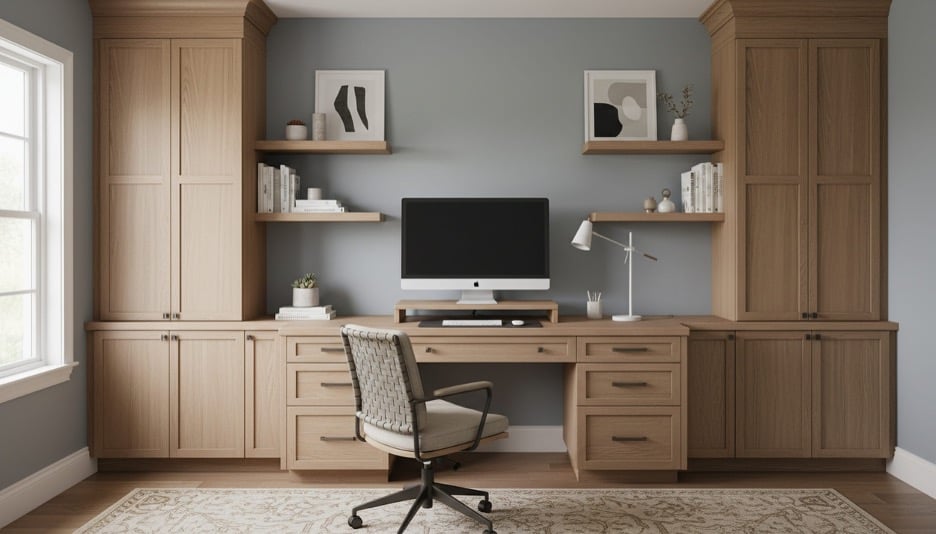
Working from home has shifted from a temporary arrangement to a permanent reality for millions of people. And with that shift has come a growing awareness that the furniture you work on every day matters far more than most people gave it credit for when they first set up a makeshift desk in the corner of a bedroom. A proper home office is no longer a luxury. It is a workspace that directly affects how you feel, how productive you are, and how your home looks and functions as a whole. This guide walks through everything you need to know before buying home office furniture, so you invest in pieces that serve you well for years rather than ones you replace in eighteen months.
Why Home Office Furniture Deserves More Thought Than Other Purchases
Most furniture purchases come down to how something looks and whether it fits the space. Home office furniture adds a third dimension that living room or bedroom furniture does not carry the same way: it has to perform under daily use for hours at a time.
A sofa gets sat on for a couple of hours in the evening. An office chair gets used for six to nine hours every workday. A dining table hosts meals a few times a day. A desk holds a monitor, a keyboard, notebooks, and coffee cups for the better part of every morning and afternoon. The wear, the ergonomic demands, and the functional requirements are simply in a different category.
This is why treating a home office purchase the same way you would treat picking out an accent chair is a mistake that catches up with most people quickly. The back pain, the clutter, the poor lighting situation, and the general sense that the space does not work the way it should are almost always the result of furniture that was chosen primarily on looks or price without enough thought given to how it would actually be used.
Starting With the Chair: The Most Important Piece in the Room
Before you think about desks, shelving, or anything else, the chair deserves the most attention and often the most budget. You will spend more time in your office chair than any other piece of furniture in your home, which makes it the single highest-impact purchase in a home office setup.
The most common mistake people make is buying an office chair based on how it looks in a photo. Ergonomic support cannot be assessed visually. A chair that looks sleek and modern may offer almost no lumbar support, a seat pan that is too deep for shorter people, or armrests that cannot be adjusted to a comfortable position.
When evaluating chairs, focus on five adjustable features: seat height, lumbar support position, seat depth, armrest height, and backrest recline. A chair that lets you adjust all five can be dialed in for your specific body. One that only adjusts seat height is essentially a fixed chair dressed up with wheels.
Seat depth is the measurement from the front edge of the seat to the back. For proper circulation, there should be roughly two to three fingers of space between the front edge of the seat and the back of your knees when you are seated fully back. Many people who experience leg fatigue or discomfort after long sitting sessions are dealing with a seat that is too deep for their frame, pushing them to perch at the edge instead of using the backrest.
Mesh backs are popular for their breathability in warmer months, but they vary significantly in quality. A thin mesh with minimal structure will sag over time and stop providing the support it offered when new. Look for chairs with a more structured mesh panel or a foam-padded back if longevity is a priority.
Choosing the Right Desk for How You Actually Work
The desk market in 2026 has more options than at any point in history, which makes the decision harder rather than easier. The key is to start with how you work rather than with what looks good in the room.
If your work primarily involves a computer, a depth of 24 to 30 inches gives enough room for a monitor at a healthy distance from your eyes, which for most people is roughly an arm’s length away. Going shallower than 24 inches to save space often results in the monitor being too close, which contributes to eye strain over time.
If your work involves writing, drawing, reviewing physical documents, or spreading out materials, you need more surface area. An L-shaped desk or a wider straight desk in the 60 to 72 inch range gives you room to keep the computer on one side and working materials on the other without constantly clearing space.
Standing desks, or height-adjustable desks, have moved well past the trend phase and are now a practical option for anyone who finds prolonged sitting uncomfortable. The key feature to look for is smooth, quiet motorized adjustment rather than manual cranks, which are inconvenient enough that most people stop using them within weeks. A good standing desk should transition from sitting to standing height and back in about 30 seconds with minimal noise.
Storage built into the desk itself is a double-edged feature. Drawers and hutches add storage but they also add visual bulk and can make a small office feel crowded. In most cases, a clean desk surface paired with a separate storage solution gives more flexibility and a tidier appearance.
How to Think About Storage Without Cluttering the Space
Storage is where most home offices go wrong. The instinct is to buy as much storage as the room can hold, but an office packed with shelving and filing cabinets often feels more chaotic than one with well-chosen, intentional storage pieces.
Start by taking an honest inventory of what actually needs to be stored in the office. Physical files, books, equipment, supplies, and reference materials all have different storage needs. A vertical bookcase works well for books and binders. A lateral filing cabinet with a solid top can double as a credenza or surface for a printer. Wall-mounted shelving keeps the floor clear, which makes even a small office feel larger.
The biggest storage mistake in home offices is underestimating the value of closed storage. Open shelving looks appealing in design photos but requires constant maintenance to stay looking organized. A mix of open shelving for items that are visually tidy and closed cabinets or drawers for everything else tends to work better in real use.
Cable management is a storage issue that rarely gets enough attention before purchase. A desk with no cable management built in will accumulate a tangle of visible cords within days of setup. Look for desks with grommets, built-in channels, or clip systems on the back edge. Even a simple cable tray mounted under the desk surface dramatically improves the overall look of the space.
Matching Your Office Furniture to the Rest of Your Home

A home office that looks like it belongs in a corporate building feels jarring in a residential setting. The materials, finishes, and proportions of your office furniture should connect to the rest of your home even if the function of the space is different.
In homes with warm wood tones throughout, a desk and shelving in walnut, oak, or similar warm-toned wood finishes will feel cohesive. In homes with a more contemporary palette of whites, grays, and blacks, a desk with a white or light gray surface and metal legs reads as intentional rather than out of place.
The chair is where most people make the biggest visual disconnect. A very industrial-looking task chair can feel out of place in a traditionally styled home. Many furniture makers now offer chairs with upholstered backs and seats in fabric or leather that provide ergonomic support while looking more like residential furniture. These tend to cost more than standard task chairs but are worth considering if the office is in a visible part of the home.
Lighting deserves a mention here as well, even though it is not furniture. The lighting in a home office affects how the furniture looks and how the space feels to work in. A room that relies entirely on overhead lighting tends to feel flat. A combination of overhead light, a task lamp on the desk, and a floor lamp in a corner creates layers that make the space more comfortable and more visually interesting.
Size and Layout: Getting the Most From the Space You Have
Home offices come in every size, from a dedicated room to a closet converted into a small work nook. The furniture choices should match the footprint available rather than the ideal setup you might want if space were not a factor.
In smaller spaces, the most useful principle is to keep the floor as clear as possible. Wall-mounted desks, floating shelves, and chairs that tuck fully under the desk when not in use all contribute to a sense of openness that makes a tight space more livable. A desk with legs that go all the way to the floor and offer no clearance underneath tends to make small rooms feel heavier and more cramped.
In larger dedicated office rooms, scale becomes the concern. Furniture that is proportionally too small for a generous room feels sparse and disconnected. A desk that would be a good size for a compact setup can look like it is floating awkwardly in a large room. Using a larger desk, adding a seating area if space allows, or incorporating a substantial bookcase wall helps fill the room in a way that feels considered rather than incomplete.
Before buying anything, sketch the room dimensions and mark the door swings, window locations, and any fixed elements like outlets and vents. Knowing where natural light comes from tells you where to position the desk to avoid glare on your monitor. Knowing where the outlets are determines how much flexibility you have with placement before cable lengths become a problem.
Frequently Asked Questions
How much should we expect to spend on a quality home office chair?
A well-made ergonomic chair that will hold up under daily use typically starts around $400 and can go well above $1,000 for premium options. Chairs below $200 almost always compromise on adjustability or durability. For most people working from home full time, spending in the $400 to $700 range gets a chair that supports properly and lasts for many years.
Is a standing desk actually worth it for home use?
For people who experience back discomfort, leg fatigue, or low energy during long work sessions, a height-adjustable desk can make a meaningful difference. The key is building a habit of actually alternating between sitting and standing rather than leaving it in one position. Most users find a rhythm of sitting for 45 to 60 minutes and standing for 15 to 20 minutes works well.
What is the best desk size for a home office with limited space?
A desk between 48 and 55 inches wide and 24 inches deep is a practical starting point for most single-monitor setups in a smaller room. It provides enough surface area for a monitor, keyboard, and a few working essentials without dominating the space. If the room is very tight, a wall-mounted fold-down desk can provide a functional surface that disappears when not in use.
Should office furniture match exactly or can we mix styles?
An exact match across every piece can actually make a space feel more like a showroom than a room that is lived and worked in. Mixing styles within a consistent finish palette, such as pairing a wood desk with a metal-framed chair in a complementary color, tends to look more considered and personal. The goal is cohesion, not uniformity.
How do we decide between an L-shaped desk and a straight desk?
The right choice depends on how you use the space. If you regularly need to switch between a computer and physical work materials, an L-shaped desk gives you dedicated zones for each without requiring you to constantly clear one area. If your work is primarily digital and the room is compact, a straight desk is usually the better fit since an L-shape in a small room can feel overwhelming and reduce usable floor space significantly.
The Bottom Line
A home office that works well does not happen by accident. It starts with choosing a chair that genuinely supports your body through a full workday, a desk scaled to how you actually work, storage that keeps things organized without crowding the space, and furniture that feels at home in your home. Take the time to measure the room, understand your own work habits, and choose pieces that balance function with the look you want. The result is a workspace that makes the hours you spend there noticeably better.